
LG Smart Monitor for WFH + Casual TV in Small Malaysian Condos
Most Malaysian condos do not have space for both a dedicated TV and a desk monitor. The LG Smart Monitor Swing argues you only need one screen — a 4K touchscreen with webOS streaming, USB-C dock and a rolling stand. We test the claim.
A typical Malaysian condo living-cum-dining area is 200–350 sq ft. Adding a 50-inch TV on the wall plus a 27-inch monitor on a desk uses 80% of the available visual real estate. For one-person and couple households, that is two screens fighting for the same room.
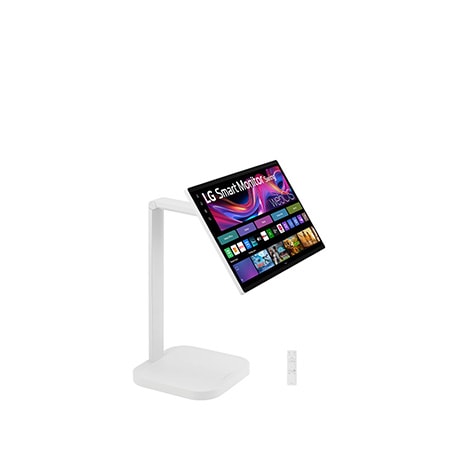
The LG Smart Monitor Swing (31.5" 4K touchscreen) argues you only need one. We test the claim against four real-world conditions: focused work, casual TV, gaming, and movie night.
What the Smart Monitor actually is
It is a 32-inch 4K display on a wheeled stand, running LG's webOS 24 operating system — the same OS as LG smart TVs. That means it has Netflix, YouTube, Disney+, Apple TV, Prime Video, Astro Go and Spotify built in.
It also accepts USB-C input with 90W power delivery (one cable from a MacBook = display + charging + USB hub) and standard HDMI for a desktop or console. The display is touch-enabled and the stand swings on the wheel base so you can roll it from the desk to the sofa, then face the kitchen for cooking videos.
Test 1: Focused work
At 32 inches and 4K resolution, the panel scales to roughly the same on-screen workspace as two side-by-side 24-inch monitors. For coding, document drafting and spreadsheet work, that is plenty.
The matte finish handles condo lighting — overhead LEDs and window glare both — without the reflection issues that affect glossy TV panels. USB-C single-cable docking means a MacBook user has zero cable management on the desk: power, display, mouse and keyboard all flow through one cable.
What it lacks: it is 60Hz, not 144Hz. For programmers and writers, this does not matter. For creative professionals editing 4K video, the panel is good. For competitive FPS gamers, this is not the screen you want.
Test 2: Casual TV
webOS handles streaming the way LG's TVs do. Netflix loads in 2 seconds, runs at 4K HDR. Casting from a phone via AirPlay or screen mirror works without a separate Apple TV box.
The 32-inch screen size is smaller than a typical living room TV, but at 1.5–2 metres distance (typical condo sofa-to-TV distance), the perceived size is similar to a 50-inch TV at 3 metres. Closer viewing distance evens out the screen size differential.
The wheeled stand means you can roll the screen from the desk into a comfortable TV position in the evening, then back to the desk in the morning. For solo or couple households without dedicated workspace, this is the killer feature.
Test 3: Casual gaming
HDMI 2.1 input means PS5 and Xbox Series X both connect natively. 4K 60Hz, VRR supported. For story-driven games (open-world, RPG, racing) this is excellent.
For competitive shooters, the 60Hz refresh is the limit. Most casual gamers will not notice. Hardcore PvP players will.
Test 4: Movie night
The built-in speakers are 5W stereo — adequate for late-night viewing at low volume in a quiet condo. For real movie-night sound, pair via Bluetooth to an XBOOM speaker or a soundbar.
The 4K HDR panel handles dark scenes well. Black levels are not OLED-grade — the panel is IPS, not OLED — but for non-purist viewing in a brightly lit condo, the image quality is more than enough.
Where the form factor wins
Where it does not win
What it costs to run
Running the monitor 10 hours per day uses about 1.5 kWh — roughly RM0.66 per day at TNB 2026 rates, or RM20/month. Slightly more than a typical TV because of the higher pixel density and USB-C power delivery loop.
Subscription fit
LG Subscribe makes sense for the Smart Monitor in a bundle — typically alongside a soundbar and a CordZero vacuum as the "first apartment" bundle. The subscription removes the upfront for a fresh-out-of-college or first-rental household, with maintenance and replacement bundled.
For someone with a fixed budget who wants to buy outright, the unit is also available on cash. The subscription is the right call for households who want flexibility — moving between condos, changing setups, or not committing capital to a category they are not sure about.
The honest verdict
A 32-inch 4K Smart Monitor with webOS, USB-C dock and a wheeled stand is the single best screen choice for a Malaysian condo dweller who works from home and watches TV in the same room. For larger spaces and families, a separate TV and monitor still wins. The line is drawn around space, not budget.
Related reading
Next step
Replacing a TV and a monitor with one Smart Monitor in a small condo? Send us a photo of your living-cum-dining area on WhatsApp with rough measurements. We will tell you whether 32 inches is the right call or whether you should still go separate-screen.
Get a plan recommendation tailored to your home.
Chat with our LG Subscribe consultants on WhatsApp. We'll walk through your needs and send a quick recommendation with no pressure to commit.